
Best Free iLovePDF Alternative: No Daily Quotas, No Sign-Up
iLovePDF is an online PDF service. Its supported workflows, account requirements, limits, advertising, and plan terms can change, so check the provider's current pages for the specific task you need before comparing alternatives.
PDFGem is a free alternative with 32 active PDF tools, all of which process files in your browser. No daily quotas, account requirement, or premium upsell.
Why People Search for iLovePDF Alternatives
The reasons fall into a few clear categories, based on what users consistently bring up in forums and review sites:
- Usage limits on the free tier. The number and size of free tasks can vary by operation and plan, which can interrupt a batch workflow.
- Account prompts. Some workflows may require signing in or moving to a paid plan. For a quick one-off task, that adds overhead.
- File upload concerns. Server-based tools must receive the file before processing it. Retention and deletion then depend on the provider's current policy rather than on the file remaining on your device.
- Task-specific file restrictions. Conversion and compression limits can differ by operation and plan, which matters for image-heavy documents or large presentations.
None of this makes iLovePDF a bad product. But if any of these constraints affect your workflow, a different approach might serve you better.
What Makes a Good PDF Tool Alternative
Before jumping to a specific recommendation, here is what actually matters when evaluating PDF tools:
- Predictable access. A tool should explain its file limits clearly and avoid surprising users with a task quota halfway through a workflow.
- No forced sign-up. If you need to compress a PDF before emailing it, you should not need to create an account first.
- Privacy by design. The strongest privacy guarantee is not a promise to delete files later — it is never uploading them in the first place. Client-side processing means your browser does the work, and no file data crosses the network.
- A comprehensive toolset. Switching between three different websites for merge, convert, and sign is not efficient. One platform should cover the full workflow.
PDFGem: 32 Active Tools, Privacy-First, Completely Free
PDFGem is a web-based PDF suite with 32 active tools. They process files directly in your browser using modern web technologies, so documents stay on your device throughout the operation.
Here is what sets it apart:
- No daily quotas. PDFGem does not meter operations across the day. Per-operation file-size, file-count, complexity, and device-memory limits still apply.
- No account required. Open a tool, drop your file, get your result. No email, no password, no profile.
- No premium tier. Every feature is available to every user. There is no "upgrade to unlock" barrier.
- Client-side processing. Active file tools such as Merge PDF, Compress PDF, and Sign PDF process the selected document in your browser. Analytics and Sentry may receive technical telemetry, but not the document contents.
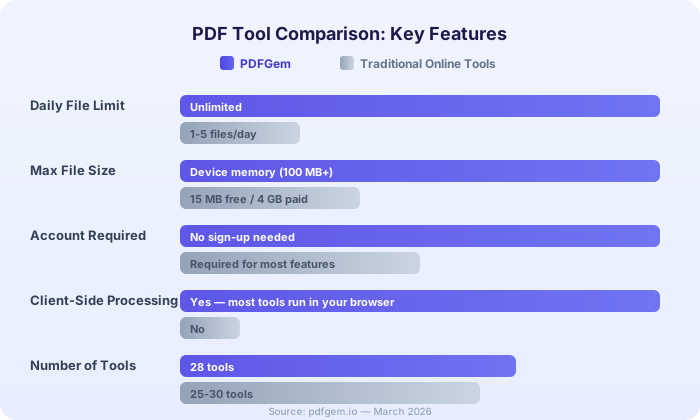
Feature Comparison: PDFGem vs Traditional Online PDF Tools
| Feature | PDFGem | Typical Free Online Tools |
|---|---|---|
| Daily file limit | None | Free-tier quotas vary |
| File size limit | Tool-specific browser limits | Varies by task and plan |
| Account required | No | May be required |
| Client-side processing | Yes (all active file tools) | Varies by provider and operation |
| Number of tools | 32 active | Varies by provider |
| Ads | May display ads | Varies by provider and current plan |
| Premium upsell | None | Varies by provider and current plan |
Privacy: Client-Side vs Server-Side Processing
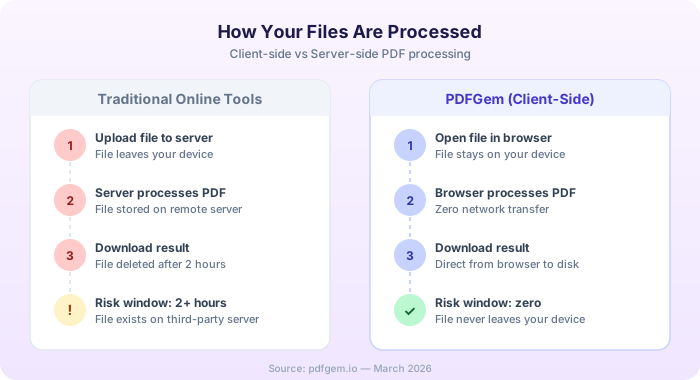
This is where the architecture really matters. With a server-based PDF operation, the file takes a round trip: upload, remote processing, then download. During that cycle, the document exists on the provider's infrastructure and is governed by its current security and retention terms.
With client-side processing, PDFGem does not need a server-side copy of the document. Your browser reads the file, runs the operation locally, and writes the result for download. Technical analytics or error telemetry can still use network requests, but they do not receive the selected document's contents.
You do not have to take our word for it. Open an active PDFGem file tool — Merge PDF, Compress PDF, or Sign PDF — and monitor the Network tab in your browser DevTools. You should not see the selected document uploaded for processing; technical telemetry requests are separate.
Key Tools Overview
PDFGem covers the full spectrum of PDF operations:
- Merge PDF — Combine multiple PDFs into one. Drag to reorder before merging.
- Compress PDF — Render pages as JPEG in a new image-based PDF. The process is lossy, removes interactive and semantic features, and may not reduce an already optimized file.
- Word to PDF — Convert supported DOCX content to rasterized A4 PDF pages. Complex layout can change, and the output does not retain selectable text.
- PDF to Word — Extracts embedded text, headings inferred from font size, and page breaks into an editable DOCX. Columns, tables, images, and complex layouts may require manual repair.
- Sign PDF — Draw or upload one visible signature mark onto a page. It is not a certificate-based digital signature.
- OCR — Extract text from scanned PDFs for copying or TXT download. It does not add a searchable layer to the PDF. Supports 16 languages.
- Protect / Unlock — Add or remove password protection. Encryption happens locally.
Why Webpage to PDF Is Offline
Capturing an arbitrary live webpage requires a remote browser. That former server route was retired, so PDFGem marks Webpage to PDF unavailable instead of displaying a converter that cannot complete. To save a webpage now, open it in your browser and choose Print, then Save as PDF.
PDF to Word rebuilds selected text structure, PDF to Excel infers rows and columns from positioned text, and PDF to PowerPoint creates image-based slides. The document-to-PDF tools reconstruct or rasterize supported content rather than reproducing every Office feature. Their pages describe the limitations to check in the output.
No Premium, No Upsell
Some PDF services pair a free tier with paid plans; which operations or limits require an upgrade depends on the provider's current terms. PDFGem instead makes the features of its 32 active tools available without a subscription.
The site may display advertising and accepts voluntary donations. Neither changes which active tool features are available.
If you have been hitting daily limits, creating accounts you do not want, or wondering where your files go after you click "Convert," give PDFGem a try. Thirty-two active tools, no daily quota, and no server-side copy of the selected document for processing. Limits for each operation still depend on the tool, file, and device.
Frequently Asked Questions
Is PDFGem free without daily quotas?
Yes. All 32 active tools are free, with no daily quota or required account. File-size limits vary by tool and are shown on the relevant page.
Does PDFGem upload my files to a server?
The 32 active tools process the selected document in the browser and do not upload it for the operation. Separate technical analytics and error-diagnostic requests may still occur.
How does PDFGem compare to iLovePDF?
Both cover common PDF tasks. PDFGem’s 32 active tools process files locally without an account or daily quota. For iLovePDF, check its current plans, supported surfaces, limits, and privacy terms for the workflow you need.
Can I verify that PDFGem processes files locally?
Yes. Open your browser DevTools (F12), go to the Network tab, and use an active file tool such as Merge PDF or Compress PDF. The selected document is not transmitted for processing; separate technical analytics or error telemetry may still appear.
What tools does PDFGem offer?
PDFGem has 32 active tools for page organization, conversion, compression, OCR, security, forms, reading, editing, redaction, signatures, and image workflows. Webpage to PDF is currently unavailable.
Does PDFGem work on mobile devices?
PDFGem uses a web interface, but support and practical capacity vary by tool, browser, document complexity, and available device memory. Check the tool page and the output; demanding workflows may work better on a desktop.