
Best Free iLovePDF Alternative: No Limits, No Sign-Up
iLovePDF is one of the most popular online PDF platforms, and for good reason — it offers a wide range of tools with a straightforward interface. But its free tier comes with real constraints: file size caps around 15 MB for conversions, limited batch processing, and ads throughout the experience. If you regularly work with PDFs, those limits add friction fast.
PDFGem is a free alternative with 28 PDF tools, most of which run entirely in your browser. No daily quotas, no account required, no premium upsell.
Why People Search for iLovePDF Alternatives
The reasons fall into a few clear categories, based on what users consistently bring up in forums and review sites:
- Daily limits on the free tier. iLovePDF restricts how many files you can process per day without a paid subscription. If you need to merge 10 PDFs on a Monday morning, you may hit the wall before lunch.
- Forced account creation. Several features require signing up, which means handing over your email and creating yet another password. For a quick one-off task, that feels like unnecessary overhead.
- File upload concerns. Every file you process through a traditional online tool gets uploaded to a remote server. iLovePDF states files are deleted within 2 hours, but that still means your contracts, tax forms, or medical records sit on third-party infrastructure during that window.
- File size restrictions. Free accounts are capped at 15 MB for PDF conversions and 200 MB for compression — a problem when dealing with image-heavy documents or large presentations.
None of this makes iLovePDF a bad product. It has earned its 200+ million users. But if any of these constraints affect your workflow, a different approach might serve you better.
What Makes a Good PDF Tool Alternative
Before jumping to a specific recommendation, here is what actually matters when evaluating PDF tools:
- No artificial limits. A tool you can rely on should not cut you off after 3 files. The 2026 PDF editor software market is projected to reach $5.55 billion — there is room for tools that serve users without a paywall.
- No forced sign-up. If you need to compress a PDF before emailing it, you should not need to create an account first.
- Privacy by design. The strongest privacy guarantee is not a promise to delete files later — it is never uploading them in the first place. Client-side processing means your browser does the work, and no file data crosses the network.
- A comprehensive toolset. Switching between three different websites for merge, convert, and sign is not efficient. One platform should cover the full workflow.
PDFGem: 28 Tools, Privacy-First, Completely Free
PDFGem is a web-based PDF suite with 28 tools. The majority process files directly in your browser using modern web technologies — your documents stay on your device throughout the entire operation.
Here is what sets it apart:
- No daily quotas. Process as many files as you need, whenever you need.
- No account required. Open a tool, drop your file, get your result. No email, no password, no profile.
- No premium tier. Every feature is available to every user. There is no "upgrade to unlock" barrier.
- Client-side processing. Tools like Merge PDF, Compress PDF, and Sign PDF run entirely in your browser. You can verify this yourself: open DevTools (F12), switch to the Network tab, and watch — no file data leaves your device.
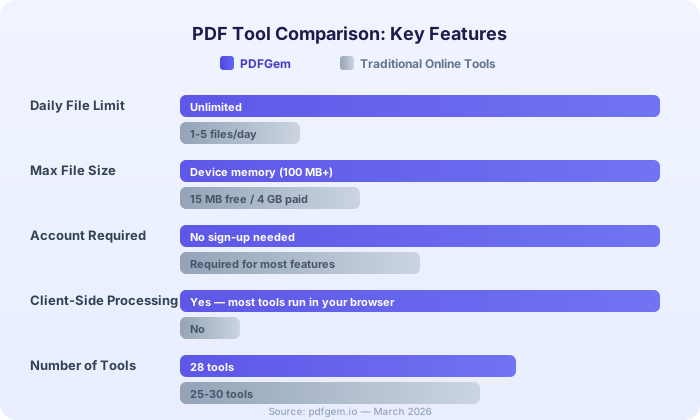
Feature Comparison: PDFGem vs Traditional Online PDF Tools
| Feature | PDFGem | Typical Free Online Tools |
|---|---|---|
| Daily file limit | None | 1-5 files/day |
| File size limit | Device memory (100 MB+) | 15-25 MB (free tier) |
| Account required | No | Often yes |
| Client-side processing | Yes (most tools) | No (files uploaded to server) |
| Number of tools | 28 | 20-30 |
| Ads | Minimal, non-intrusive | Frequent banners and pop-ups |
| Premium upsell | None | Persistent upgrade prompts |
Privacy: Client-Side vs Server-Side Processing
This is where the architecture really matters. When you use a traditional online PDF tool, your file takes a round trip: upload to server, process, download result. During that cycle, your document exists on infrastructure you do not control. Even with encryption and deletion policies, there is an inherent window of exposure.
With client-side processing, that window does not exist. Your browser reads the file, processes it using optimized algorithms running locally, and writes the result directly to your downloads folder. The file never enters a network request.
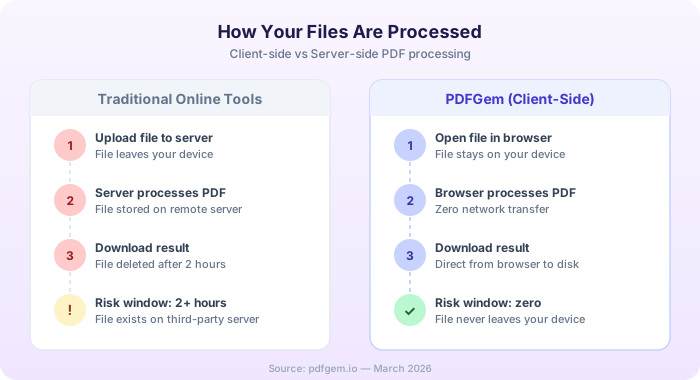
You do not have to take our word for it. Open any PDFGem client-side tool — Merge PDF, Compress PDF, Sign PDF — and monitor the Network tab in your browser DevTools. You will see zero file uploads during the operation.
Key Tools Overview
PDFGem covers the full spectrum of PDF operations:
- Merge PDF — Combine multiple PDFs into one. Drag to reorder before merging.
- Compress PDF — Reduce file size for email attachments. Typical reduction: 40-70% on image-heavy documents.
- Word to PDF — Convert .docx files with Quick mode (instant, in-browser) or Full mode (server-side, pixel-perfect formatting).
- PDF to Word — Convert PDFs to editable Word documents. Server-side processing preserves text, tables, and layout.
- Sign PDF — Draw, type, or upload your signature directly onto any PDF. Entirely client-side.
- OCR — Extract text from scanned PDFs. Supports 16 languages. Runs in your browser.
- Protect / Unlock — Add or remove password protection. Encryption happens locally.
When Server-Side Processing Is Needed
A handful of PDFGem tools use server-side processing for tasks that require rendering engines not available in the browser. These include:
- Word to PDF (Full mode) — For documents with complex tables, custom fonts, and multi-column layouts.
- PDF to Word / Excel / PowerPoint — Accurate reverse conversion requires server-side rendering.
- Webpage to PDF — Captures live web pages as PDFs using a server-side browser.
For these tools, your file is transferred over an encrypted connection, processed immediately, and deleted right after. No files are stored, and no copies are retained.
The key distinction: you always know which mode you are using. Tools with both options show a clear Quick/Full toggle, so you can choose client-side when privacy is the priority and server-side when formatting fidelity matters more.
No Premium, No Upsell
Many free PDF tools exist as lead magnets for paid subscriptions. The free tier is intentionally limited to push you toward upgrading. PDFGem takes a different approach: every tool, every feature, is available to everyone. There is no "Pro" tier hiding behind a button.
The site is sustained through minimal, non-intrusive advertising and voluntary donations from users who want to support the project. That is the entire business model.
If you have been hitting daily limits, creating accounts you do not want, or wondering where your files go after you click "Convert," give PDFGem a try. Twenty-eight tools, zero restrictions, and your files stay where they belong — on your device.